
This guide introduces the optional Lookout Assist-powered features for care plans. It explains what Lookout Assist can do - generate a care plan from documents, propose updates from care events, and identify risks - why it's useful, what you need to have enabled, and the key principle that a person always reviews before anything is published.
New to care plans? For the basics of what care plans are and how to build them manually, start with our Care plans: an overview and Manually creating and managing care plans articles. This article covers the optional Lookout Assist layer on top.
Lookout Assist and care plans
Lookout Assist is Lookout's suite of AI-powered features. For care plans, it takes on the heavy lifting of drafting and maintaining a plan, while always keeping a staff member in control of what actually gets published.
With Lookout Assist enabled, it can:
- Generate a care plan from documents you upload (such as an assessment, intake form, or clinical notes) and any extra context you add.
- Propose updates to an existing care plan based on new care events, such as submitted form responses, incident actions, and observation investigations.
- Identify risks for supported funding schemes, proposing risk categories, levels, reasoning, and mitigations aligned to the Strengthened Aged Care standards.
Everything Lookout Assist produces is a draft - it never becomes a Member's live care plan until a staff member reviews and publishes it.
The key principle
A human is always in the loop. This is the most important thing to understand about Lookout Assist and care plans.
Lookout Assist never publishes a care plan on its own. Every draft and every proposed update must be reviewed, edited if needed, and published by a staff member.
Lookout Assist speeds up the work and surfaces useful information, but the clinical judgement and the decision to publish always rest with your team. You'll also see a reminder on every draft that AI can make mistakes and should be carefully reviewed before saving.
New to Lookout Assist? It's a suite of AI-powered features used across Lookout, not just for care plans. To learn about all its capabilities, see our dedicated Lookout Assist article.
For organisations with Lookout Assist enabled, the care plan features can:
- Save significant time: Turning documents and events into a structured draft, rather than building or updating a plan from scratch.
- Improve consistency: Drafts follow your chosen template's categories and structure every time.
- Keep plans current: Lookout Assist proactively proposes updates when new information arrives, so plans don't drift out of date.
- Support safer care: It can surface risks aligned to the Strengthened Aged Care standards, giving your team a head start on identifying and mitigating them.
- Keep control with your team: Because nothing is published without a staff review, you get efficiency without giving up oversight.
Before you start
To use the Lookout Assist care plan features, make sure:
- The Care plans (Clinical care) feature is enabled for your organisation.
- Lookout Assist is enabled for your organisation.
- The Care Plan and assessments agent is turned on within your Lookout Assist settings.
- You have workflow or care management permissions to create, edit, and publish care plans.
Please note: If your organisation uses Lookout Assist to support third-party suppliers through purchase order workflows, you'll also need Connected Care enabled and the Handover Summaries agent turned on. To learn more about Lookout Assist across the whole system, see our Lookout Assist article.
Working with Lookout Assist and care plans
The Lookout Assist care plan features fall into three areas, each with its own dedicated guide.
Generating a care plan
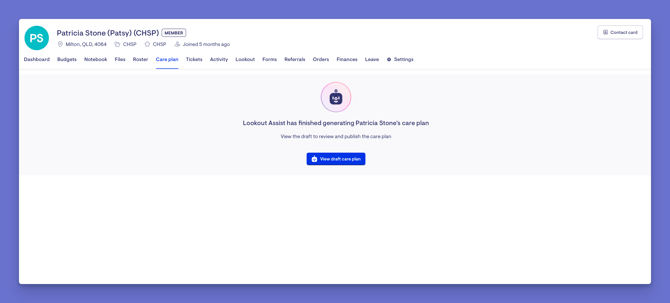
When a Member doesn't have a care plan yet, Lookout Assist can create a draft from documents you upload and any extra context you add - organised into your chosen template's categories, ready for you to review and publish.
→ Please view our dedicated article to learn more about generating a care plan with Lookout Assist.
Updating and maintaining a care plan
When a Member already has a care plan, Lookout Assist can propose updates based on new care events - such as submitted forms, incident actions, and observation investigations - and prompts you to review the plan when there's new information worth considering. It clearly marks what's changed and lets you compare the current and proposed versions side by side before you publish.
Care plan risk detection
For supported funding schemes, Lookout Assist can identify risks aligned to the Strengthened Aged Care standards, proposing a risk category, level, context, and mitigations for your team to review.
→ Please view our dedicated article to learn more about care plan risk detection.
Troubleshooting
I don't see the option to generate or review a care plan with Lookout Assist
Lookout Assist must be enabled for your organisation, and the Care Plan and assessments agent must be turned on in your Lookout Assist settings. You'll also need workflow or care management permissions.
Lookout Assist published a care plan without me - is that possible?
No. Lookout Assist never publishes on its own. Every draft and update must be reviewed and published by a staff member.
A care plan draft doesn't show any risks
Risk detection is only supported for certain funding schemes (HCP transition, Support at Home, and CHSP). For others - such as NDIS, DVA, VHC, and Private - a banner may indicate that risks aligned to those standards won't be shown.
The generated draft has mistakes or missing information
This is expected - a draft is a starting point, not a finished plan. Review every section, edit as needed, and only publish when you're satisfied it's accurate. AI can make mistakes.
Still have a question? Please take a look at our Care plans: FAQs, where we answer the most common questions about care plans in one place.