
This guide explains what a care plan is, why it matters, what it contains, and how it's kept up to date in real time. It also covers who can see a care plan and what admins, Helpers, and Members each see.
New to care plan terms? You may find it helpful to review our Care plans: Glossary of terms article alongside this guide, which explains key terms like categories, templates, directives, and risk management in plain language.
What is a care plan?
A care plan is a shared agreement that outlines the support a Member will receive and how it will be delivered. It gives both Helpers and Members clarity and confidence, and forms part of the ongoing health record between the Member and your organisation.
A care plan brings together:
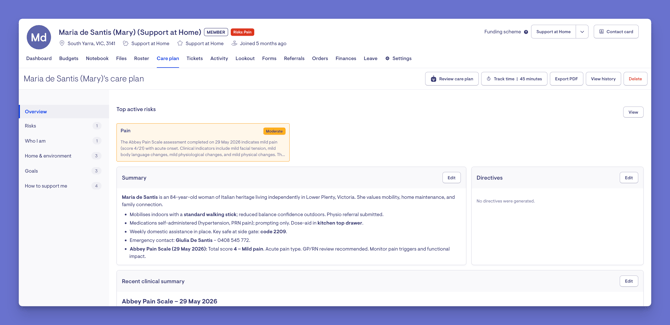
- Clinical information: Through the care plan overview, with six sections: Summary, Directives, Clinical summary, Conditions, Medications, and Allergies.
- Personalisation: The Member's goals, service preferences, and strengths, so the plan reflects their individual needs, preferences, and expectations.
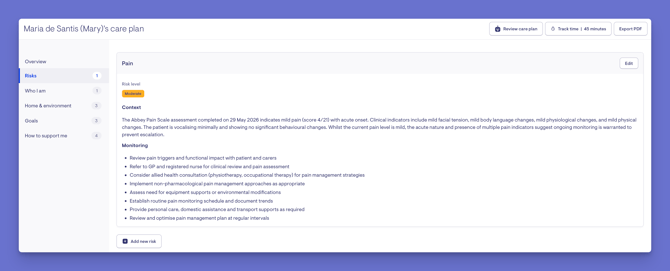
- Risk management: Risk categories, levels, reasoning, and mitigations, tracked directly on the plan.
A note on naming: From June 1 2026, the navigation tab on Member profiles changed from "Help plans" to Care plan for all organisations. This is a navigation change only - your existing data is not affected.
Why care plans matter
Care plans are one of the most important tools in Lookout - they sit at the heart of safe, consistent, person-centred care. There are numerous benefits to keeping them accurate and up to date:
Clear, safe care delivery
A care plan tells Helpers exactly how to support a Member - their background, their environment, how to access the home, and any clinical history or risks. Anyone delivering care can see what to do and how, which is especially important on a first visit, when a Member returns after being away, or after a recent change.
Always current, in real time
When you publish a change, it's immediately available in the app to the Member, their loved ones, and their current Helpers - with no manual resending. The most up-to-date plan is always the single source of truth, so no one is ever working from an outdated version.
Risk visibility at the point of care
Top active risks, aligned to the Strengthened Aged Care standards - surface right where they're needed, including on the Helper's visit screen. Frontline workers get the clinical context they need at the moment of care, without digging through notes.
Truly person-centred
A care plan captures the Member's goals, service preferences, and strengths. It's more than direction for workers; it's your agreement with the Member about what they can expect from you, reflecting their individual needs and preferences.
Continuity and confident handovers
Because the plan is a living record accessible to everyone involved, care stays consistent even as the team around a Member changes. Whoever picks up the next visit has the full picture.
Compliance and audit-ready records
Risks are aligned to the Strengthened Aged Care standards, and every change is tracked with a full history of who changed what and when. The care plan forms part of the Member's ongoing health record and is ready for reviews and audits.
Families stay informed and connected
Members and their Authorised Representatives can view the plan in the app, so they stay informed about the support being provided and reassured that it reflects their needs.
Navigating to a Care plan
Admin staff and care managers will find a Member's care plan by following the steps below:
- From the main navigation menu, click Members to open the full list of Members.
- Find the Member you're after - use the search box to type their name, or narrow the list using the filters.
- Click the Member's name to open their profile. This will load their Member dashboard.
- Click their Care plan tab.
Care plan visibility
Important - Real-time visibility: When you save any section of a care plan, it is immediately visible to the Member, their loved ones with care app access, and the Helpers currently supporting them. Changes are published in real time, so always make sure you're satisfied with a section before saving it.
For admins and staff (care managers)
- Full access to create, edit, and manage the care plan, its templates, and categories.
- Can track care management time, export the plan to PDF, and view the change history.
For Helpers (Lookout Care app)
- Once a plan is published, Helpers supporting the Member can view it as a practical guide to delivering care.
- On the visit screen, they see the top active risks and the care plan summary; they can also open the full care plan to browse its categories, clinical summary, conditions, medications, and allergies.
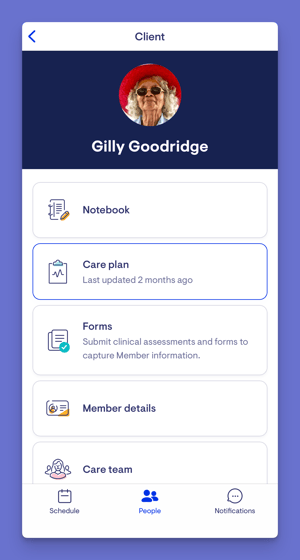
- Helpers access it from their Schedule (open a rostered visit → Care plan) or from their People tab (select the Member → Care plan).
- Helpers are encouraged to review the plan before delivering care - especially for a first visit, when a Member returns after being away, or after a recent update.
For Members and Authorised Representatives (Lookout Care app)
- Members have full access to all areas of the care app, including their care plan (via their profile → account section → Care plan).
- Authorised Representatives mirror the Member's experience and also have full access, including the care plan.
- They can see what support and services are approved, any equipment, goods, or consumables included, and the Member's documented goals and preferences.
For Billing Recipients and Sharers
- These roles have limited access in the care app and cannot see the Member's care plan.
Working with care plans
Care plans are made up of a few connected parts. Here's how they fit together, and where to learn more about each.
Creating care plan templates (Admin)
Templates give every care plan a consistent structure - the categories and items, and the prompts that guide staff. Administrators build and manage these from Settings, and can mark categories as required or optional.
Keep in mind: once a template's categories and items are in use, their order is fixed - items appear as cards and can't be dragged to reorder - so it's worth planning the order carefully as you build.
→ Please view our dedicated article, Creating care plan templates, to learn more.
Manually creating and managing care plans
Care managers create a Member's care plan from a template, fill in each category, and update it over time as needs change.
The rule that catches people out: saving a section publishes it in real time to the Member, their loved ones, and their current Helpers - so always be sure you're happy with it before you save.
→ Please view our dedicated article to learn more about manually creating and managing care plans.
Care plans with Lookout Assist (optional)
If your organisation has Lookout Assist enabled, it can generate a care plan from documents, propose updates based on care events, and identify risks aligned to the Strengthened Aged Care standards.
→ Please view our dedicated article to learn more about care plans with Lookout Assist.
Troubleshooting
The "Help plans" tab has changed to "Care plan"
From 1 June 2026, this navigation label changed for all organisations. This is expected and doesn't affect your data.
I can't see a care plan for a Member
If no plan has been created yet, you'll see a prompt to create one. Otherwise, check you have access to the Member and permission to view care plans.
A care plan isn't showing on a Helper's app
The plan only becomes available within 7 days of a Helper's first scheduled visit with the Member. It also won't show if the Helper hasn't completed a visit in the past 30 days and has none upcoming, or if the Member has multiple memberships and the plan sits on a different membership than the visit.
A change I made isn't visible to the Member or Helper
Changes publish in real time when saved. Confirm the section was saved, and that the Helper is currently connected to the Member.
I can't edit the care plan
Editing requires workflow or care management permissions. If you can view but not edit, ask an administrator within your organisation to review your access.
Still have a question? If the articles linked above haven't answered it, take a look at our Care plans: FAQs, where we answer the most common questions about care plans in one place, and offer guidance on contacting Support.