
Connected Care is Lookout’s enhanced way to manage third‑party services delivered to members, adding confirmation of delivery, supplier workflows and stronger visibility across the full purchase order lifecycle.
Connected Care builds on Lookout’s existing purchase order functionality by introducing supplier portals, check‑in and check‑out, delivery statuses, QR codes, checkout notes, tracking links - while keeping purchase orders, tickets and existing billing processes in place.
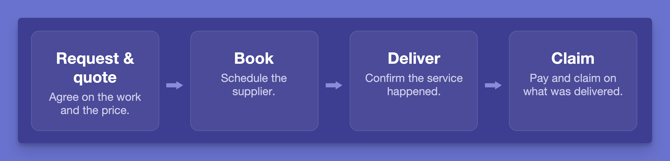
Connected Care now covers the full journey: request and quote, book, deliver and claim. You can send service requests to suppliers, agree the work and price, and turn their response into a purchase order without leaving Lookout.
Before you start
To use these features, make sure:
-
You have the relevant access permissions (e.g. purchase order access, finance access, or admin-level access, depending on the feature).
In Release Hub, Connected Care has two parts:
-
Connected Care: Confirmation of delivery
-
Connected Care: Quote and book
- If you haven't enabled Confirmation of delivery yet, you'll see a single Connected Care entry instead. Enabling Quote and book also turns on Confirmation of delivery.
-
When Quote and book is enabled, roles that already have purchase order permissions automatically get the matching service request permissions.
-
If your organisation uses Lookout Assist, Supplier quote reader and Supplier message reader are switched on automatically.
Feature overview
Confirmation of delivery
Purchase orders now support a full delivery lifecycle - from creating the PO, to requesting confirmation of delivery, to seeing the delivery status and checkout notes all in one place.
What this means for you:
-
Purchase order line items can now have a delivery status: Scheduled, Checkout available, In progress, Completed or Cancelled, or Tracking if a courier link is added.
- You can see checkout notes, location data, and cancellation details - just like visits to support remote care monitoring.
-
Purchase orders now support must-do tasks, service instructions and attachments at the purchase order line item level.
- This gives you a complete picture of all services delivered to a Member.
To learn more about this feature, read its dedicated article: Confirmation of delivery
QR code checkout
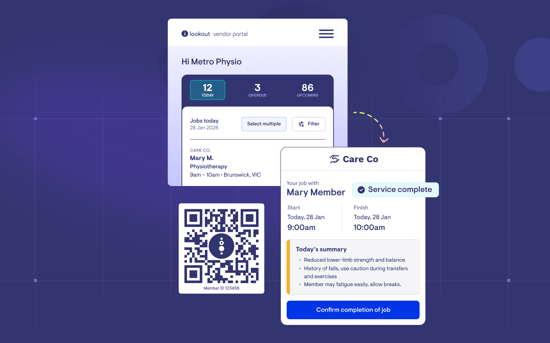
Each Member’s home is assigned a QR code for supplier check-in, which should be clearly displayed on-site. On arrival, workers scan the code to log in to the Supplier Portal, view their jobs, and complete check out. These QR codes do not expire. As an alternative, jobs can also be accessed via an emailed link.
- QR codes can be generated per Member and downloaded in bulk
- Scanning takes the worker directly to the relevant Member's jobs
Read the full article: QR codes for Supplier checkout
The Lookout supplier portal
A secure portal where your third-party suppliers can log in, view their assigned jobs, and check in/out of service deliveries. This complements the email-only checkout workflow with a more secure, auditable, and efficient experience.
Key highlights:
-
Suppliers receive an email invitation, set up their account, and add their workers (required for QR code flow, optional for link-based access).
-
Once signed in, suppliers can view all jobs assigned to their organisation - with labels showing which care provider each job relates to (they may work with multiple providers).
-
Suppliers and their workers can check in, complete must-do tasks, record checkout notes and location, and mark jobs as complete.
-
Built-in role levels: Owner, Admin, Worker and Worker (limited access), so suppliers can manage their own team and job access.
-
Suppliers respond to service requests from the Service requests area of the portal, sorted into Needs response, Awaiting provider, Accepted, Declined and Cancelled.
-
Suppliers can also manage their organisation details and import basic worker details in bulk.
-
Owners and Admins can assign or reassign jobs to their workers.
-
Owners and Admins can request a change or cancellation on a job.
-
Owners and Admins can message the care team.
Related articles:
For Suppliers: Getting started with the Lookout Supplier Portal.
Service requests (request and quote)
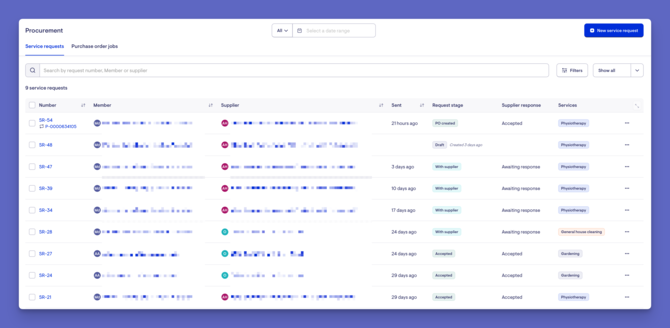
Agree on the work and price with a supplier in Lookout before a purchase order is raised, instead of over the phone and email.
What this means for you:
-
Send a service request to a supplier, either at one of their rates or asking for a quote.
-
Suppliers respond in the supplier portal, and you can message them on the request.
-
When you're happy with a response, create the purchase order, with the lines added for you.
- You'll find Service requests under Procurement in the left-hand menu, alongside Purchase order jobs, Suppliers and Supplier Helpers (previously called Third party providers).
To learn more, read our Service requests article.
Changes after booking
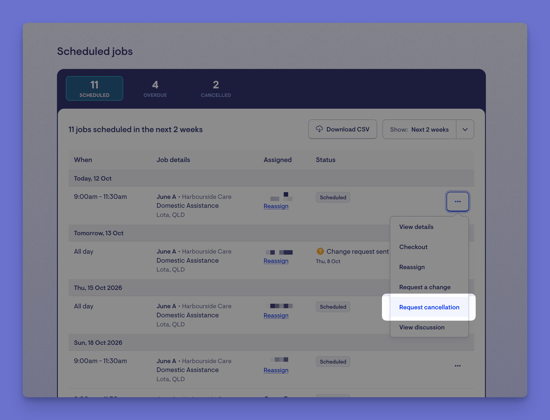
Suppliers can request a change or cancellation on a booked job. The purchase order shows Changes requested, and your team clicks Review changes to approve or reject each one. Approved changes are applied straight to the purchase order line. Nothing changes until your team approves it.
Messaging suppliers
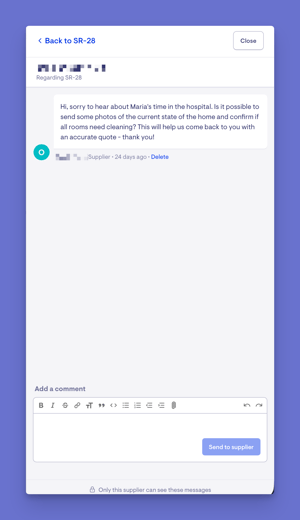
Service requests and purchase orders each have their own supplier discussion. Messages on the request stay with the request, and the purchase order gets its own discussion once it's created. Suppliers can't see the ticket's internal discussion. A discussion closes once the work is complete or the request is cancelled.
Lookout Assist & Handover summaries
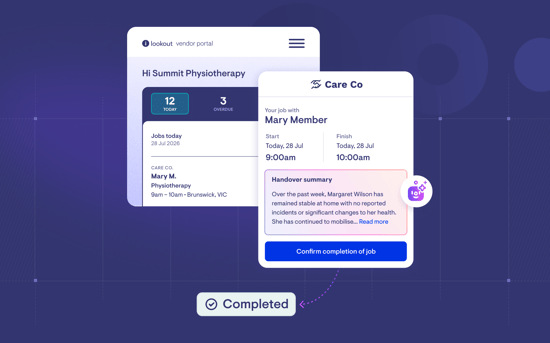
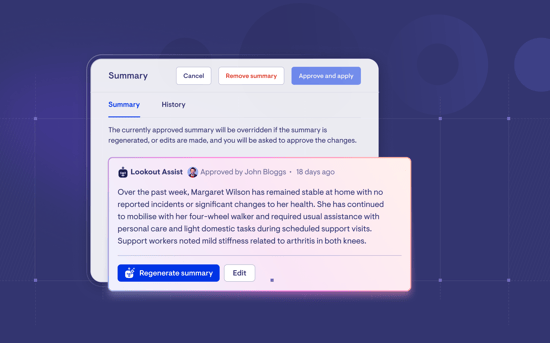
Instead of sharing the entire care plan with a supplier, Lookout Assist can now generate a summary of the care plan tailored to the specific service being delivered. This gives third-party workers relevant context before they arrive - without sharing beyond what is relevant to their assigned service delivery.
How it works:
- When setting up a service request or purchase order, you can enable the Lookout Assist summary feature.
- Lookout Assist automatically generates a summary relevant to the services on that purchase order.
- The summary can be reviewed, edited, or regenerated before saving.
- It's then visible to the supplier worker when they view the job (either via email checkout link, QR code, or the Supplier Portal).
Two more Lookout Assist agents support Quote and book. Supplier quote reader reads a supplier's quote and drafts the purchase order lines for you to check. Supplier message reader spots change and cancellation requests in supplier messages and raises them for your team to review.
To learn more about this feature, read the full article: Lookout Assist and Handover summaries
Additional purchase order improvements
Purchase orders have undergone a slight revamp under Connected Care, including the selection of checkout options and the publication of jobs to the supplier portal.
Several smaller but impactful improvements have also been made to purchase orders:
Courier tracking links
- You can now add a courier tracking link to any purchase order line item.
- When a tracking link is added, the line item's status changes to "Tracking" so you can easily see which items are in transit.
- Members/loved ones can see the courier tracking link in the Care app and track progress themselves without asking their care manager for updates.
- Tracking links can also be added in bulk.
Member leave - purchase order integration
- When scheduling Member leave, Lookout now shows any purchase order line items that conflict with the leave period.
- You can cancel conflicting purchase order lines directly from the leave flow — the same way you currently handle visit conflicts.
Improved duplication
When duplicating a purchase order line item, you now have more control:
- Choose to duplicate must-do tasks and notes.
- Set recurring delivery dates (daily, weekly, or monthly) with flexible scheduling options.
- Duplicating purchase orders helps preserve more details, helping you save time and manual effort.
Sorting by delivery date
Purchase order line items can now be sorted by delivery date and filtered by matched, unmatched, or all – helping you manage your schedule more easily. For improved visibility, the sidebar can also be collapsed.
Read the full article here: Connected care and purchase orders.
What happens next?
After these features are enabled:
- Your purchase orders will show delivery status, checkout notes, cancellations, and capabilities previously only available for visits.
- Suppliers can be onboarded to the portal, improving the security and auditability of third-party service delivery.
- Claims can be submitted with confidence that the services have been delivered.
- Supplier invoices can be matched to confirmed delivery.
- You'll have a single, unified view of all services delivered to each Member - first-party and third-party alike.
What users / staff / Members will see
For admins & finance staff
- Full access to configure delivery confirmation options, finance settings for auto-invoicing, and supplier portal invitations.
- Visibility into delivery statuses, checkout notes, and supplier invoices across all purchase orders.
- Ability to generate QR codes and manage supplier relationships.
- Setting up service request permissions alongside purchase order ones.
For rostering & care staff
- Can see delivery statuses on purchase order line items within tickets and Member rosters.
- Can send, resend, and revoke checkout links to suppliers.
- Can review checkout notes and must-do responses from suppliers.
- Raising service requests, reviewing supplier responses, creating purchase orders from them, and approving or rejecting supplier change and cancellation requests.
For suppliers (via portal or email)
- Receive email notifications with checkout links or portal invitations.
- Can check in, complete must-do tasks, record notes and location, and confirm delivery.
- Portal users can manage their workers and view jobs from multiple providers.
- Responding to requests, requesting changes or cancellations, assigning jobs and messaging the care team.
For Members (The Member app)
- See the status of the purchase order line items in the Care App. For example, when it’s completed or cancelled.
- Can see and access courier tracking links
Troubleshooting
I can't see delivery status on purchase orders
- Make sure the confirmation of delivery feature has been enabled for your organisation via Release Hub.
- Check that you have the correct access permissions for purchase orders.
The supplier didn't receive their checkout link email
- Verify the supplier's email address is correct on the purchase order line.
- Check whether the supplier contact has opted out of receiving checkout links.
- Try resending the checkout link from the purchase order line item. Ask the supplier to check their spam or junk folders.
A supplier can't log in to the portal
- Make sure the Supplier connection feature is enabled. You can see this on the supplier profile in Lookout.
- Check that the supplier has been sent an invitation and has completed account setup.
- They may need to verify their email address first.
- If they see "Your invitation link has expired or is invalid. Please contact support for assistance.", resend it from the supplier's profile in Lookout using Resend invitation.
I can't cancel purchase order lines during Member leave
- Make sure you have the relevant purchase order and cancellation permissions.
- The purchase order line must be in a cancellable status (not already completed or cancelled).
I can't see Service requests or Procurement in the menu
Check that Connected Care: Quote and book has been enabled in Release Hub, and that your role includes View service requests. See our Service requests article for more.
Still need help?
If you're still experiencing issues, please contact our Support Team and include:
- Screenshots (if possible)
- The Member's name
- The exact steps taken
- Any error messages received