
Overview
What is Lookout Assist?
Lookout Assist is a suite of AI-powered features embedded throughout Lookout. They have been designed to save time on repetitive tasks, improve the quality of information shared between teams, and keep care plans up to date - all while keeping a human in the loop for approval.
Lookout Assist currently reaches into key areas of Lookout:
- Care planning: creating, updating, and maintaining care plans using documents, observations, incident actions, and form responses.
- Worker availability: helping Helpers update their availability through a conversational chat interface in the Lookout app.
- Third-party handover summaries: generating tailored summaries for suppliers so they have the right context about a Member before delivering a service.
- Budgets: reviewing a Member's Support at Home budget, explaining why funds are being over- or under-spent, and suggesting actions to review.
-
Supplier messages: spotting change and cancellation requests suppliers make in purchase order discussions, and raising them for staff to review.
- Supplier quotes: reading a supplier's quote document, and drafting purchase order lines for staff to check.
Each of these capabilities can be enabled independently for your organisation from the Lookout Assist settings area.
Where Lookout Assist appears across Lookout
|
Area |
What Lookout Assist does |
Who sees it |
|
Care plans (Admin) |
Creates new care plans from uploaded documents, updates existing care plans based on care events (observations, incident actions, form responses), and proposes risk assessments |
Admins and Care Managers |
|
Availability (Helper App) |
Provides a chat-based assistant that helps Helpers set and update their recurring availability schedule through natural conversation |
Helpers (via the Lookout app) |
|
Purchase orders (Admin) |
Generates handover summaries tailored to the services being delivered, providing suppliers the right context related to their work and protecting the privacy of the full care plan |
Admins, Care Managers, and Supplier Workers |
|
Lookout forms |
Interprets form responses and summarises response history over time, surfacing trends for care managers |
Admins and Care Managers |
|
Budgets (Admin) |
Reviews each funding source in a Member's budget on request, explains why spending is running over or under, and suggests actions that staff review before anything changes |
Staff with access to view Member finances |
| Purchase orders (Admin) | Reads supplier messages in a purchase order's discussion, spots change and cancellation requests, and raises them as Changes requested for staff to approve or reject |
Staff working on purchase orders Suppliers see a note that Lookout Assist reads their messages |
|
Service requests (Admin) |
Reads a quote document attached to a supplier's response and proposes purchase order lines for staff to check | Staff working on service requests |
Key features
Handover summaries
Lookout Assist generates tailored care plan summaries for purchase orders, giving suppliers the right context about a Member before they deliver a service, without sharing the entire care plan.
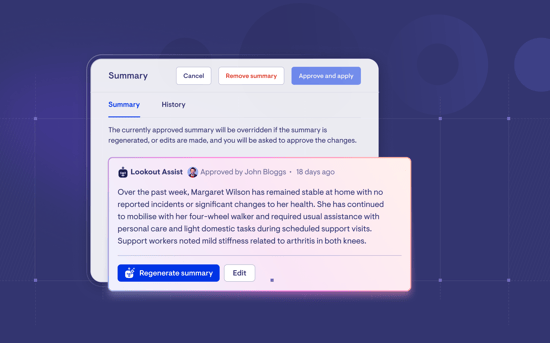
To learn more, take a look at our dedicated Handover summaries article.
Want to learn more about Connect Care and its new features? Read our article.
Supplier message reader
Catch change and cancellation requests in supplier messages. Lookout Assist spots when a supplier asks to change or cancel a purchase order in a discussion and drafts a variation request for staff to review.
When it detects a request, the purchase order shows "Changes requested". Click Review changes, open each Change request or Cancellation request, and approve or reject it. Nothing changes until someone on your team approves it.
To learn more, read our Service requests article.
Please note:
- Lookout Assist only reads messages in a purchase order's discussion, not messages on a service request.
- It doesn't act on jobs that are already completed or cancelled.
- It only picks up cancellation requests if your organisation has cancellation reasons set up.
- Suppliers see a note in the portal: "Lookout Assist reads your messages to spot any requested job changes or cancellations. The care team reviews these before anything changes."
Supplier quote reader
Turn supplier quotes into purchase order lines. Lookout Assist reads the quote attached to a supplier's response and drafts the lines, so staff check them against the document instead of typing them in.
When a supplier sends a quote as a document, open their response and click Review quote under Quote review. Lookout Assist proposes the lines, and each one maps to a line in the supplier's quote. Check them against the document before you create the purchase order. If a line is wrong, you can adjust it.
If at any point, Lookout Assist isn't sure the document is a quote, or can't find any lines, it tells you, and you can enter the lines yourself.To learn more, read our Service requests article.
Care plan creation and updates
Lookout Assist can generate complete care plans from uploaded documents (such as IAT’s, clinical transcripts, referral letters, or other clinical notes) and update existing care plans when new care events occur - such as observations, incident actions, or form responses.
When generating or updating a care plan, Lookout Assist:
- Analyses uploaded documents and care events
- Produces proposed changes for the care plan (including entries, summaries, clinical summaries, risks, medications, conditions, and allergies)
- Flags potential issues (such as conflicting information across documents, illegible scans, or missing information)
- Requires a human to review and approve before any changes are applied
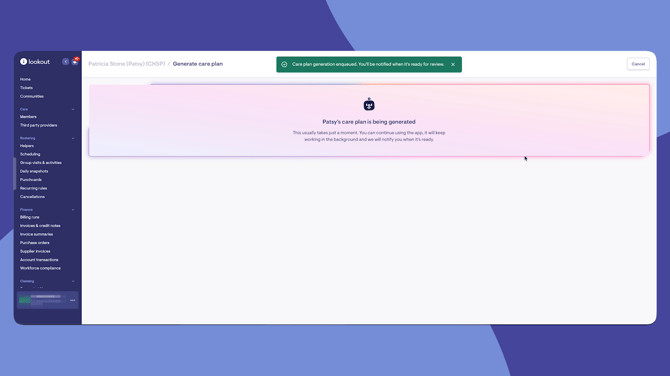
This feature is available to Admins and Care Managers from the care plan area of a Member's profile.
To learn more about Care plans with Lookout Assist enabled, read our article: New Care plans.
Availability management (Helper App)
Helpers can update their weekly availability through a conversational chat assistant in the Lookout app. Instead of manually filling in forms, Helpers can type naturally - for example, "I'm available Monday to Wednesday 9am to 3pm starting next week" - and the assistant will:
-
-
Understand their request
-
Show them a confirmation of what it's understood
-
Save their availability schedule once they confirm
-
Helpers can submit availability using free text in English, or in their native language. Lookout Assist supports the following languages:
-
-
English
-
Spanish
-
Portuguese (Brazil)
-
Italian
-
French
-
Indonesian
-
German
-
Arabic
-
Chinese (Simplified)
-
Korean
-
Japanese
-
Hindi
-
You can simply chat to Lookout Assist in any of these languages, and it will respond in the same language.
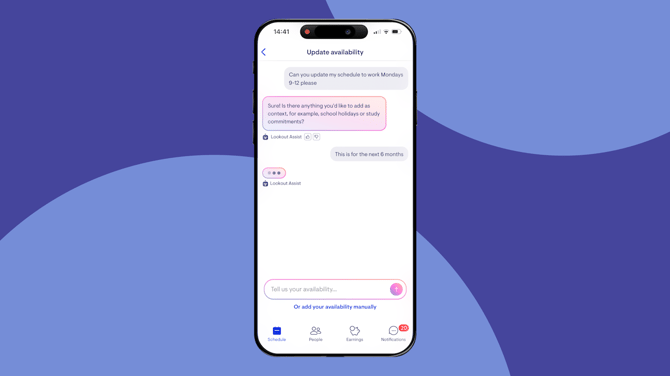
The assistant is aware of the Helper's current and upcoming schedules, their time zone, and the next 30 days' dates. For staffers reviewing availability requests, the assistant helps approval workflows move faster by presenting clear, concise schedule summaries.
This feature appears in the Lookout Helper app under the Availability section.
To learn more, read our Availability management article.
Forms interpretation
When form responses are submitted (such as FRAT, FROP, PAS etc.), Lookout Assist can:
-
Interpret individual responses: Providing a plain-language summary of what was captured, highlighting changes from the previous response
-
Summarise response history: Looking across multiple responses over time to surface trends and notable changes for care managers
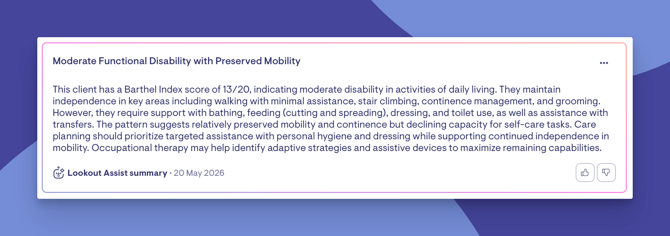
This helps care teams quickly understand patterns without needing to review every individual form submission in detail.
To learn more, read its dedicated article: Clinical forms.
Funding analyser
The Funding analyser helps you understand a Member's Support at Home budget. Instead of working through every service line to find out why a budget is drifting, you can ask Lookout Assist to review it. It explains in plain English what's happening and what you could do about it.
The review appears on the Live & projected balance tracking tab of a Member's budget, with one review available for each funding source. When you click Generate AI insights, Lookout Assist:
- Analyses spending against the funding available
- Explains why it's over- or under-spent, for example a mid-period price rise, a service charged to the wrong funding source, or a warning that hasn't been actioned
- Suggests actions, some of which can be applied through the budget's bulk-action tools after you've checked them
- Lets you create a funding assessment ticket that carries the summary across, for anything that needs a follow-up conversation
- Requires a human to review and confirm before any change is made
Please note: Reviews only run when you ask for one, and past reviews are kept so you can see how a budget has changed over time.
To learn more, read our dedicated article: Budgets with Lookout Assist: Funding Analyser.
Lookout Assist settings
Organisation administrators can manage Lookout Assist from the main navigation menu. Each capability can be enabled or disabled independently, including Care plans and assessments, Availability assistant, Handover summaries, Funding analyser, Supplier message reader and Supplier quote reader.
The Lookout Assist settings page also shows:
- Which agents are currently active
- AI impact metrics - estimated time saved and automated tasks over configurable time periods (last 7, 30, or 90 days)
Still need help?
If you're still experiencing issues, please contact our Support Team and include:
- Screenshots (if possible)
- The Member's name
- The exact steps taken
- Any error messages received