
This guide explains what a Helper is, why Lookout uses that word, and how to navigate to and search for Helpers within the system.
New to Helper terminology? You may find it helpful to review our Helpers: Glossary of terms, which explains key words like contracts, matching preferences, and incompatibilities in plain language.
What is a Helper?
A Helper is a person providing care or support to a Member. This includes support workers, care workers, clinicians, and third-party providers.
When we designed Lookout, we spent time listening to the people who use home care services. One thing we heard clearly was that traditional, clinical language can feel impersonal. So we chose words that feel more human, more supportive, and easier to connect with - and "Helper" is one of them. It reflects the supportive, personal relationship a Helper has with the Members they care for, rather than reducing them to a job title.
Helpers can be employees, contractors, or volunteers, and they're verified for suitability before providing care. Everything about scheduling, matching, and delivering care revolves around connecting the right Helper with the right Member.
Want to onboard a Helper? Please read our dedicated article to learn more.
Before you start
To view and search Helpers, make sure:
- You have access to view Helpers. This is controlled by your access role - if your role doesn't include it, you may not see the Helpers option under Rostering.
- To view a specific Helper, they need to belong to a community you have access to (unless your access reach is set to Full - access to every community).
Navigating to Helpers
- From the main navigation menu, click Helpers under the Rostering section.
- You'll see a list of all the Helpers you have access to.
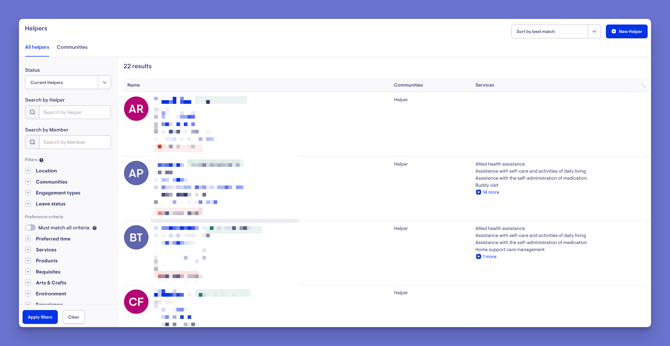
Top tip: This is your central view of everyone providing care across your organisation.
For each Helper in the list, you'll see:
- Their name and preferred name, plus any banners (such as a flag that their verifications are missing)
- The company they're in and their contact details
- The communities they belong to
- The services they provide
Search and filter
You can quickly narrow the list to find the right person:
- Filter by status to focus on active Helpers.
- Search by name - first name, last name, or preferred name.
- Turn on filters such as location, communities, engagement type, and leave status.
- Search by preference criteria and any custom attributes.
- View Helpers by community - for example, selecting a community shows all the Helpers within it.
Click the blue Apply filters button to surface the Helpers matching your filters. Use the Clear button to remove all filters.
Open a Helper's profile
- Select a Helper from the list to open their dashboard - a complete view of their details, communities, services, contracts, schedule, and more.
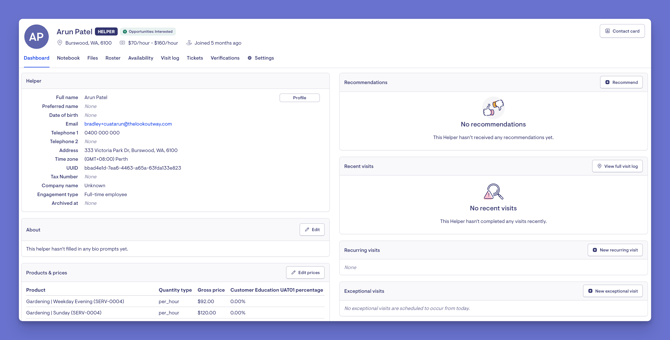
For a full breakdown of the dashboard and every tab within a Helper's profile, see our guide: The Helper Dashboard & Profile Tabs.
What different Users / Staff will see
For staff with access to the community
- Can view and search the Helpers within that community, and open their profiles.
For staff with restricted or no access to a community
- Won't see Helpers outside the communities they've been given access to.
For Members and Helpers
- This is an internal, staff-only view. Members and Helpers don't see the admin Helpers list.
Onboarding a New Helper
Ready to bring someone new on board? Onboarding a Helper happens in two steps - first creating their profile, then setting them up as a Helper.
- Creating a Profile - how to set up the basic record for a person (this is the same for Members, Helpers, and Staffers).
- Onboarding a Helper - how to turn a profile into a Helper by setting their role, engagement type, communities, and services.
Troubleshooting
I can't find a Helper I'm looking for
- Check your status filter - the Helper may be archived or filtered out by another active filter.
- Try searching by preferred name, in case their listed name differs from what you expect.
- Confirm you have access to the community that Helper belongs to.
I can't see any Helpers at all
- You may not yet have access to any communities, or your access role may not include viewing Helpers. Ask an administrator to review your access.
Still Need Help?
If you're still experiencing issues, please contact our Support Team and include:
- Screenshots (if possible)
- The user's name/email
- The exact steps taken
- Any error messages received