
This guide explains how Lookout Assist identifies risks for a Member's care plan - what each risk shows, which funding schemes are supported, where risks appear, and how your team reviews them before publishing.
New to Lookout Assist and care plans? For the bigger picture, start with our Care plans with Lookout Assist article. Risk detection happens as part of creating and updating a plan, so you may also find our Generating a care plan with Lookout Assist and Updating and maintaining care plans with Lookout Assist articles helpful.
What is care plan risk detection?
When Lookout Assist is enabled, it can help identify risks for a Member and surface them directly on their care plan. It does this by analysing patterns across a Member's care data, such as repeated incidents or concerning observations, and flagging potential risks aligned to the Strengthened Aged Care standards.
Each detected risk is proposed with:
- Risk category: The type of risk (for example, falls and mobility, sensory impairment, or cognitive impairment).
- Risk level: How significant it is (for example, high, medium, or low).
- Context: Why the risk exists (the background and reasoning).
- Mitigations: The monitoring and strategies to manage the risk.
Like everything Lookout Assist produces, detected risks are proposals for your team to review - they should be checked for quality and relevance before publishing.
Why it matters
Risk detection helps your team stay ahead of potential harm and deliver safer care:
- Proactive safety: By spotting patterns across incidents and observations, Lookout Assist can surface risks that might otherwise be missed.
- Consistent, standards-aligned: Risks are aligned to the Strengthened Aged Care standards, supporting compliance.
- Clear at the point of care: Risks appear where they're needed, including on the Helper's visit screen, so frontline workers have the context to deliver safe support.
- Actionable: Each risk comes with context and suggested mitigations, giving your team a head start on managing it.
Which funding schemes are supported?
Risk detection is supported for Members receiving:
- Home Care Package (HCP transition)
- Support at Home (SAH)
- CHSP services
For unsupported funding schemes - including NDIS, DVA, VHC, and Private - risk standards align to different regulatory requirements. You can still generate a care plan for these Members, but a banner may indicate that the care plan won't display risks aligned to the Strengthened Aged Care standards.
Before you start
- The Care plans (Clinical care) feature is enabled for your organisation.
- Lookout Assist is enabled, and the Care Plan and assessments agent is turned on in your Lookout Assist settings.
- You have workflow or care management permissions to review and publish care plans.
- The Member is on a supported funding scheme (see above).
Where risks appear
When risks are detected, they show up in a couple of places on the care plan:
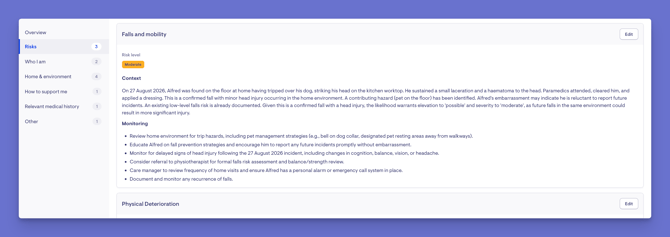
- In the care plan overview - under Top active risks.
- As a dedicated risks section within the care plan.
Risks are visible to both administrators and Helpers, so the people delivering care can see them. Each risk has an edit option, so your team can review and adjust the detail as needed.
On the Helper's visit screen
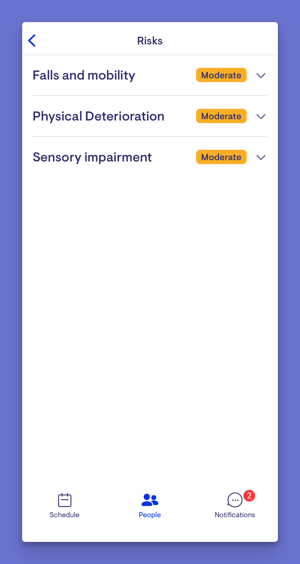
For Helpers, the top active risks appear as colour-coded cards on the visit screen (e.g., low, moderate, high, or very high), with the care plan summary below. On the dedicated risks page, Helpers and Members can view all active risks in an expandable list, each showing the category, a colour-coded severity badge, the background or rationale, and the mitigations.
Reviewing detected risks
Risks are generated as part of creating or updating a care plan with Lookout Assist. To review them:
- When you generate or update a care plan, any detected risks appear alongside the draft.
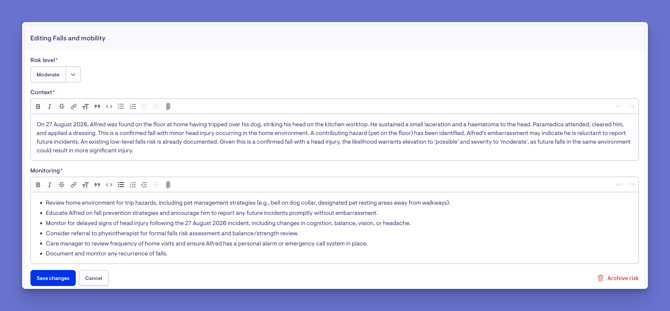
- Review each risk - its category, level, context, and mitigations.
- Click Edit on a risk to adjust the detail if needed, for example, changing a risk level or refining the mitigations.
- Once you're satisfied that the risks are accurate and relevant, publish the care plan.
Important: Always review detected risks for quality and relevance before publishing. As with any Lookout Assist output, AI can make mistakes, so your team's judgement is the final word.
What happens next?
After you publish a care plan with detected risks:
- The risks appear under Top active risks in the overview and in the dedicated risks section.
- They're visible to administrators and to Helpers, including as cards on the Helper's visit screen.
- Risks continue to evolve as the care plan is updated over time and new patterns emerge in the Member's care data.
Making the most of risk detection
Always review before publishing.
Treat detected risks as a starting point - check the category, level, context, and mitigations against what you know about the Member.
Refine the mitigations.
Adjust the suggested strategies so they're practical and specific to the Member and your team.
Use the visit-screen visibility.
Because risks surface for Helpers at the point of care, keeping them accurate directly supports safer visits.
Remember the scheme limits.
If a Member is on an unsupported scheme, don't expect Strengthened Aged Care–aligned risks. You can still capture risks manually.
Troubleshooting
No risks were detected for a Member
Risk detection is only supported for HCP transition, Support at Home, and CHSP Members. For NDIS, DVA, VHC, and Private, a banner may indicate that risks aligned to those standards won't be shown.
Risks are detected from patterns in care data - if there's little data yet, there may be nothing to surface.
A detected risk doesn't look right
Detected risks are proposals to review, not final. Select Edit on the risk to adjust the level, context, or mitigations before publishing.
Helpers can't see a Member's risks
Risks are only visible once the care plan (including the risks) has been published. Check the plan has been published, and that the Helper is currently connected to the Member.
I don't see the option to generate risks
Lookout Assist must be enabled with the Care Plan and assessments agent turned on, and the Member must be on a supported funding scheme.
Still have a question? Please take a look at our Care plans: FAQs, where we answer the most common questions about care plans in one place.