
This guide explains what the Visit Log tab is, why it matters, and how to use it to review a Helper's visit history - including who they visited, when, and their check-in details.
Want the full profile picture? The Files tab is one part of the wider Helper profile. For dedicated articles on the Member dashboard and each of the other tabs within a Helper's profile, please explore the Helpers section within our Help Centre.
The Visit log tab
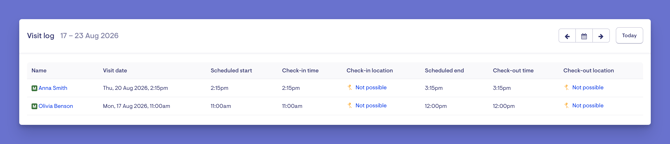
The Visit Log tab shows the history of a Helper's visits. It's a clear record of the visits they've attended - who the Member was, the date, their scheduled check-in time, and their check-in location (where location services are enabled).
Please note: The Visit Log appears if location services are enabled for your organisation.
The Visit Log gives you an at-a-glance history of a Helper's completed work. It helps your team:
- Review what's happened - a clear record of visits attended, and when.
- Confirm attendance - check-in times and locations provide evidence that a visit took place.
- Support accountability - a reliable history for queries, reviews, and record-keeping.
Before you start
- You are logged into Lookout as a staff member.
- You have access to view the Helper.
- Location services are enabled for your organisation (this is what surfaces the Visit Log).
Navigating to the Visit log tab
-
From the main navigation menu, click Helpers to open the full list of Helpers.
-
Find the Helper you're after - use the search box to type their name, or narrow the list using the filters.
-
Click the Helper's name to open their profile. This will load their Helper dashboard.
-
From the horizontal menu, select Visit log.
-
You'll see the Helper's visit history for the current week. For each visit, the log shows:
-
The Member the visit was with.
-
The date of the visit.
-
The scheduled check-in time.
-
The check-in location (where location services are enabled).
-
-
You can use the arrows to navigate through prior weeks, or the date picker to select a range.
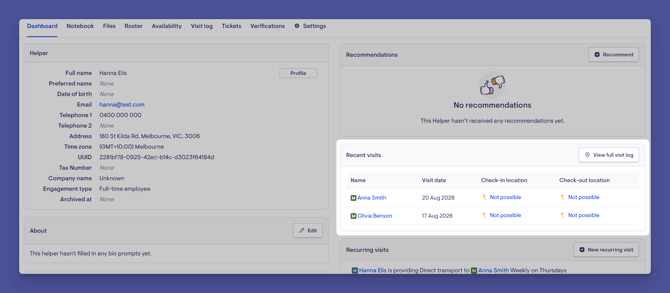
Top tip: You can also reach the Visit log from the Recent Visits tile on the Helper's dashboard by clicking the View Full visit log button.
Troubleshooting
I can't see the Visit log tab
-
The Visit Log only appears if location services are enabled for your organisation. If you don't see it, it may not be turned on.
-
Confirm you have access to view the Helper.
A visit I expected isn't showing
-
Check the week or period you're viewing - the log is shown week by week. Move to the relevant week to find the visit.
-
Only visits the Helper has checked in for appear here.
Check-in location isn't showing for a visit
Location details only appear where location services are enabled and a location was captured at check-in.
Still need help?
If you're still experiencing issues, please contact our Support Team and include:
-
Screenshots (if possible)
-
The Helper's name
-
The exact steps taken
-
Any error messages received