
By comparing your actual and planned spend against your agreed service plan, you can better understand how your care is delivered and stay in control of your support. This feature is designed to provide greater transparency into where your funding is going, build confidence that your services align with your plan, and give you the control to track spending and make informed decisions, helping you avoid unexpected overspend. It’s especially helpful if you are self-managing your services, as it allows you to actively monitor your budget and service delivery.
Please note, projected balances in the app are currently available for Support at Home members only. They are not available for NDIS or privately funded members.
How to access your projected balances & budgets
To view your projected balances & budgets:
- Tap your avatar:
- Top-left corner (iPhone or Android)
- Top-right corner (computer)
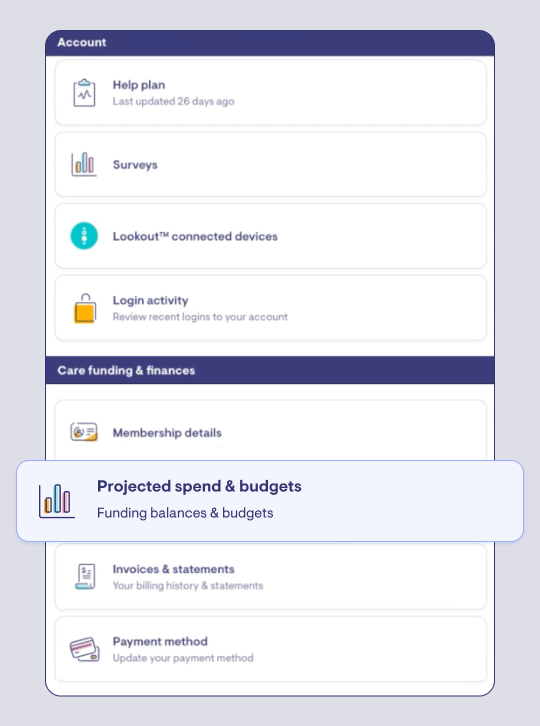
- Scroll down until you see the section labelled “Care funding & finances”
- Click the card labelled “Projected spend & budgets”
- If you can’t see anything, this may mean your provider hasn’t approved and set live any budgets for you yet so they appear in the app.
What you can see in the Care app
Your projected balances & spending
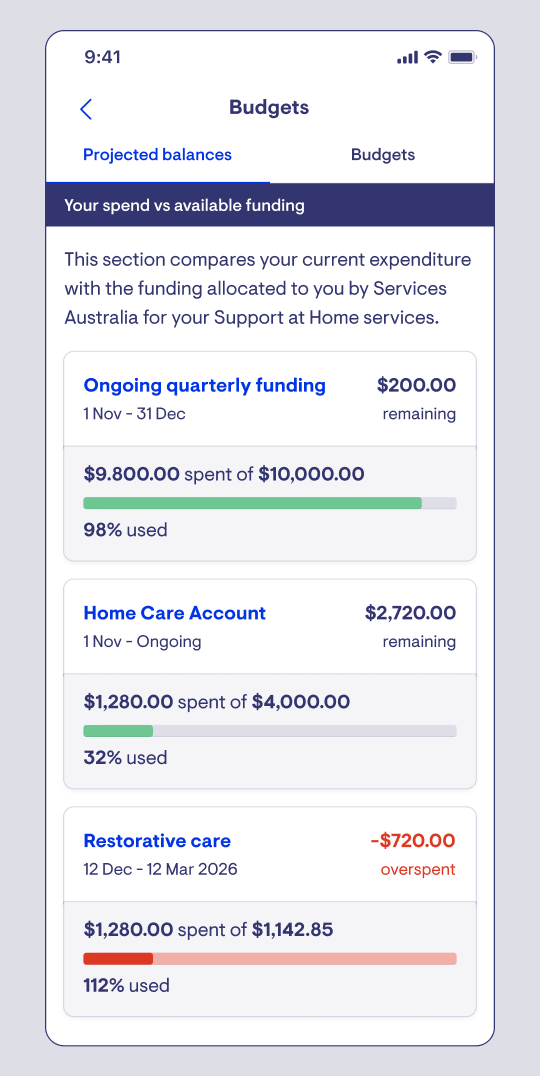
This section shows how your spending compares to the funding you’ve been allocated for the period. This may differ to the planned spend in your budgeted service plan.
For each funding type, you’ll see:
- The date range (e.g. 1 Jan – 31 Mar 2026)
- How much you’ve spent so far
- Your total funding
- The percentage used
- Your remaining balance (or if you are over budget)
Each funding source is displayed as a simple bar chart so you can quickly understand your position.
Your service plans (budgets)
Your provider creates service plans to show how your funding will be used to deliver your care.
You’ll see:
-
Active service plans
Your current agreements. These show the services and supports you are receiving right now. You can also download a copy for your records.
-
Future service plans
Plans that will start in an upcoming period.
-
Expired service plans
Previous plans that are no longer active but remain available for reference.
Viewing more detail
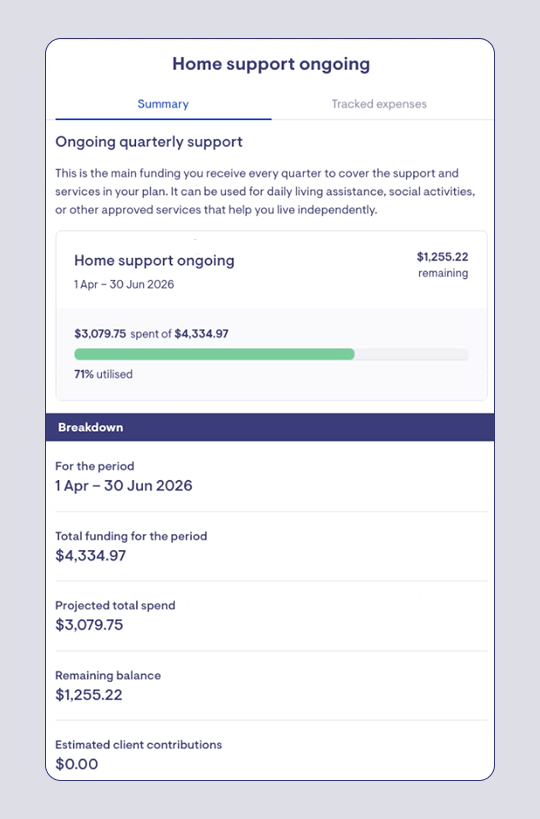
Tap into any funding source to see a detailed summary, including:
- Total funding for the period
- Projected total spend
- Remaining balance
- Estimated client contributions for the services that draw down from this funding source (if applicable)
Tracking your expenses
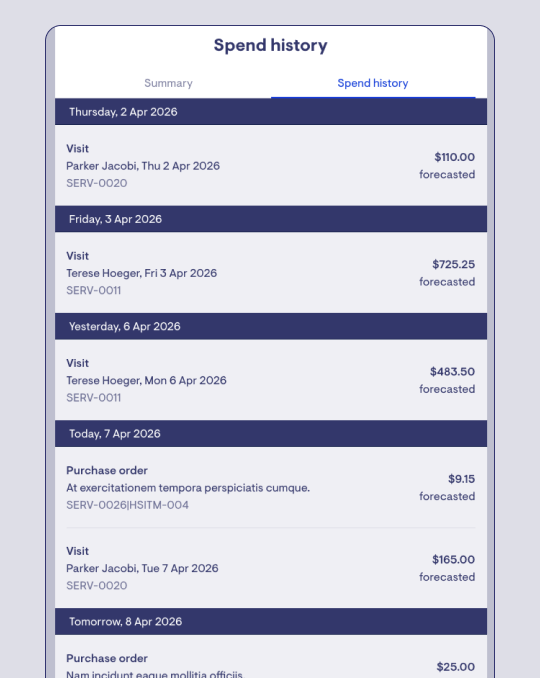
Select the “Tracked expenses” tab to see a detailed list of all activity for that funding source.
This works similar to a banking app, showing:
-
Completed expenses (actual spend)
Visits, invoices, and purchases that have already been delivered and charged.
-
Forecasted expenses (upcoming spend)
Scheduled services or planned costs that haven’t yet been invoiced. These appear with a greyed out background.
This helps you understand not just what you’ve spent, but what is expected to be spent.
Support at Home funding explained
You may see one or more of the following funding sources:
Ongoing quarterly support
Your main funding, provided each quarter to cover day-to-day supports such as personal care, domestic assistance, and social support.
Restorative care
Short-term funding to help you recover or maintain independence after illness, injury, or a change in your health.
End-of-life funding
Additional support if you are nearing end of life and wish to remain at home.
Assistive technology
Funding for equipment or devices that support your independence, such as mobility aids or communication tools.
Home modifications
Funding to make your home safer and easier to move around in, such as installing handrails or ramps.
Provider-held unspent funds
Unused funds transferred from your previous Home Care Package and held by your provider. These are generally used:
- After your current funding is exhausted, or
- Upfront for assistive technology or home modifications
Home Care Account (government-held funds)
Unused funds from your previous Home Care Package that are held by the government. These are used after any provider-held funds have been exhausted.
Client contributions
Some members are required to contribute towards the cost of their care under Support at Home, based on a government income assessment. If applicable, you’ll see an estimated client contribution in your projected balances and within your budget service plans to provide an indicative amount you may be required to pay for services received. Your provider will invoice you separately for the actual contribution amounts, based on services delivered and processed with Services Australia.
FAQs
Why can't my Members see their budget service plans?
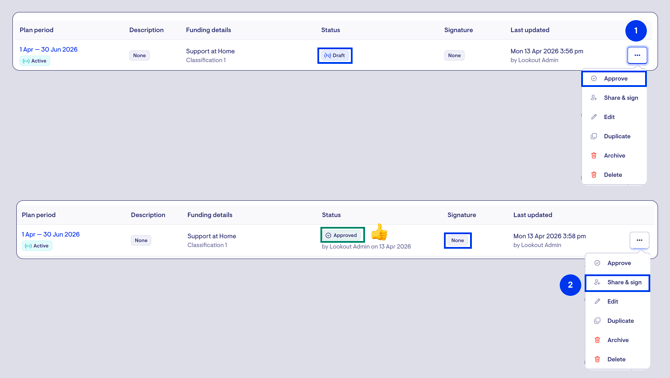
The service plan must be set as 'approved' in admin and also shared and signed for it to be available via the Care app for your Member:
Why can't my Members see their projected balances?
Members will usually be able to see projected balances and spending in the Care app, even if a service plan has not yet been approved or signed for the current period. This view is based on actual funding received from Services Australia, compared against scheduled services in Lookout for the period, and is separate from the service plan, which represents an agreed estimate and allocation of care delivery with the Member which may differ substantially from the actuals.
If a Member cannot see any information in this tab, it may indicate that their funding data is failing to sync from Services Australia. In this case, please raise a support ticket via the Lookout customer portal so we can investigate.
Why are multiple funding sources (e.g. ongoing home support and restorative care, or HCP commonwealth unspent funds and the Home Care Account) shown rolled up together?
At the moment, Lookout can’t always determine in advance which specific funding source a scheduled service will be drawn from because we don't ask for this information when a service is first scheduled. Because some Support at Home services can be funded by more than one source (e.g. clinical services), we group (or “roll up”) related funding sources (such as ongoing home support, restorative care, and end-of-life funding if they overlap at the same time) so that spending is accurately reflected against the total available pool of funds.
We recognise this is not ideal and we plan to improve how funding allocation is calculated so we can more precisely attribute spend to individual funding sources without needing to aggregate them.